
Bridging the gap between strategy, marketing and AI, helping businesses evolve with intelligence, clarity and control.
Bridging the gap between strategy, marketing and AI, helping businesses evolve with intelligence, clarity and control.

For many small businesses, the biggest drain is not one dramatic problem. It is the steady build-up of duplicated data entry, reminder emails, spreadsheet checks, status updates and repeated handovers.
The aim is not to automate everything. It is to identify where business automation can remove low-value work without making the process harder to manage.
Admin usually grows around the business rather than being designed. A process starts sensibly, then new tools, people, rules and exceptions are added until nobody has a clean view of the whole workflow.
Automation fails when it is added too early. The process needs to be simplified first, then automated where the rules are clear and the risk is manageable.
SME automation works best when it supports a defined process, saves time and leaves people in control of judgement calls.
Move form submissions, bookings or support requests into the right inbox, CRM, spreadsheet or task list without manual copying.
Trigger sensible reminders, status updates and escalation prompts so work does not stall because someone forgot the next step.
Pull key information from existing tools into simple reports so owners can see what needs attention.
Use AI carefully to summarise, classify or draft routine messages while keeping human approval on anything sensitive.
Standardise names, dates, categories and statuses so teams spend less time fixing small errors later.
Keep judgement, complaints, pricing decisions, exceptions and customer relationships with people rather than forcing automation where it does not belong.
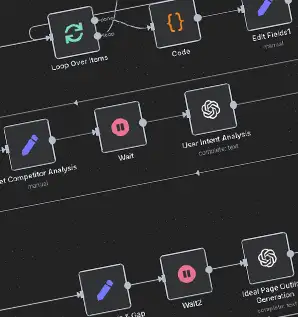
These are examples of repetitive processes that often justify a practical review.
A website form creates a lead record, notifies the right person and schedules a reminder if there is no response.
Customer details, confirmation emails, internal notes and payment checks are linked instead of manually updated in several places.
Key figures are gathered from existing sources and sent to the owner in a format they can act on.
Routine requests and reminders are sent automatically, with exceptions escalated to a person.
Short answers for SME owners considering workflow automation.
Start with repetitive, rule-based tasks that happen often, cause delays or require copying the same information between systems. Enquiry handling, reminders, reporting and CRM updates are common first choices.
Customer complaints, complex sales conversations, pricing judgement, exceptions, sensitive HR matters and final approval on risky decisions should usually stay human-led. Automation can prepare information, but people should own judgement.
Not always. Many useful workflows connect tools you already use, such as website forms, email, spreadsheets, CRMs, accounting platforms and task systems. Replacement software is only sensible when the existing setup is holding the business back.
Map the process first, simplify unnecessary steps, test failure cases and document what happens when a tool changes or data is missing. Human checks are part of a reliable automation design.
Useful next steps if the issue connects to wider systems, marketing or AI adoption.
Operator-led practical AI, automation and web systems for SMEs that need useful implementation, not theatre.
Long-running practical experience across websites, marketing systems, infrastructure and operations.
Work starts with how the business actually runs, not with a preferred tool or template.
Clear workflows, sensible testing and documentation your team can use after handover.
Based in North Wales with remote support for SMEs across the UK.
Think Menai helps SMEs use practical AI, automation and web systems to remove admin, improve leads and make the business easier to run.
Copyright 2026 - All Rights Reserved By Think Menai